An AI coding agent on your machine runs with the same permissions you do. It can read every file in your home directory, call any internal service your session can reach, and execute whatever code a model decides to generate for the next prompt.
That is the problem Microsoft is trying to solve at the operating system layer. At Build 2026 it shipped an early preview of Microsoft Execution Containers (MXC), a policy-driven execution layer that sits between an agent and the OS. You declare what the agent is allowed to touch, and Windows enforces those limits at runtime.
This post walks through what MXC is, the isolation options it exposes, and how you wire it into an agent with the TypeScript SDK. I will also be specific about what the preview does not yet do, because that matters more than the marketing.
Why agent containment is different
Traditional application security assumes the code is known ahead of time. You ship a binary, you sign it, antivirus scans it, and its behaviour is broadly fixed. Agent code breaks that assumption.
An AI agent generates code at runtime, often per prompt. It reads a file, decides to call an API, chains that into a shell command, then writes the result somewhere. None of that is known when the agent starts. Granting it your full session authority means a single bad generation — or a prompt injection buried in a document it reads — can act as you.
Containment fixes the blast radius rather than the behaviour. The agent still does useful work; it just does it inside a boundary you defined.
What MXC actually is
MXC is a sandboxed execution system for running untrusted code — model output, plugins, tool calls — on Windows, Linux, and macOS. Its value is the abstraction: one JSON configuration schema and one SDK map onto very different isolation primitives underneath.
The backends today include ProcessContainer, Windows Sandbox, IsolationSession, micro-VM (NanVix), Hyperlight, and WSLC on Windows; Bubblewrap and LXC on Linux; and Seatbelt on macOS. You pick a policy and a backend, and MXC handles the low-level isolation details. That is the point — most developers should not be hand-rolling AppContainer profiles or seccomp filters.
The native wrapper is written in Rust (roughly 70% of the repo), with a TypeScript SDK published as @microsoft/mxc-sdk.
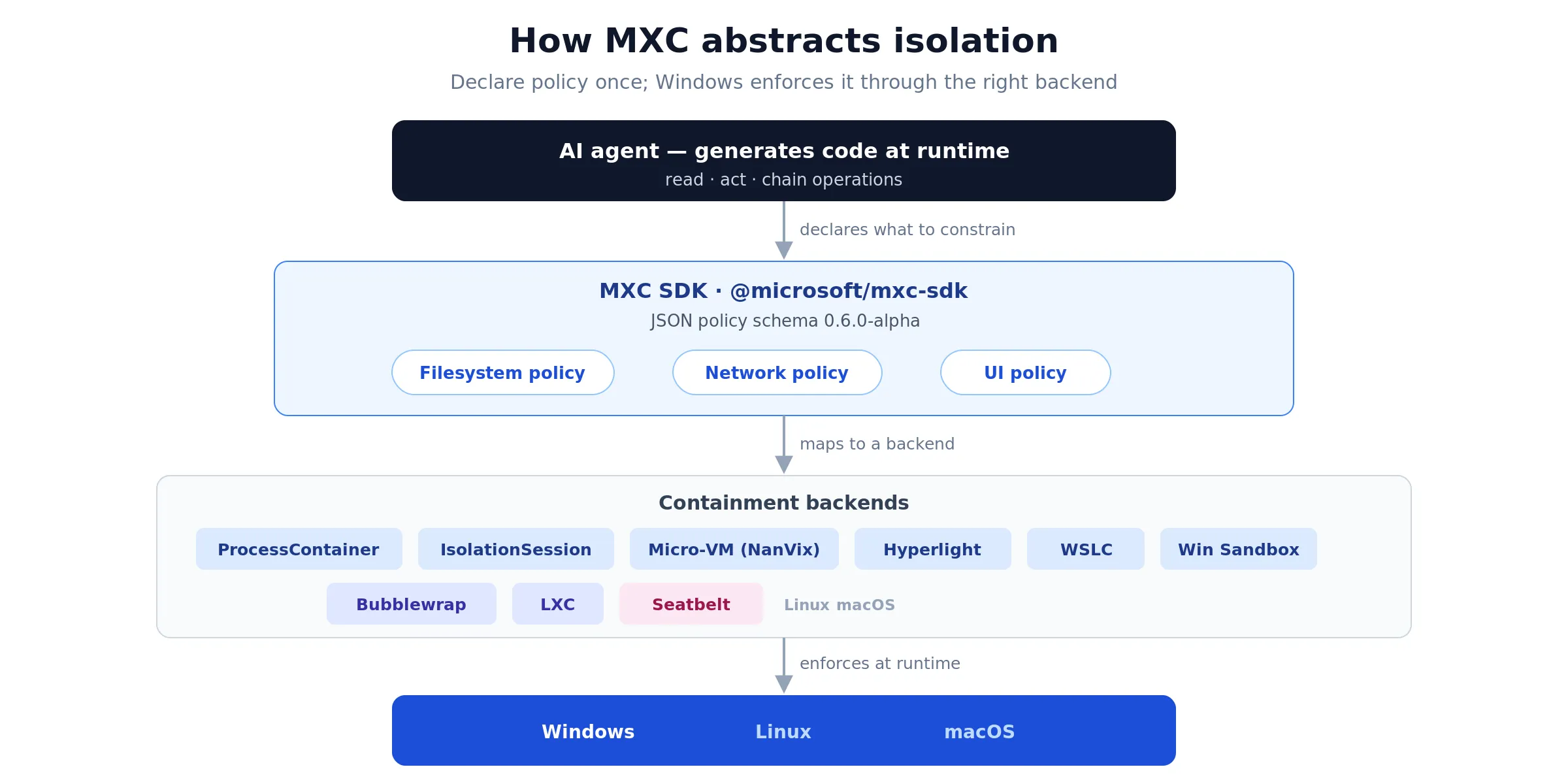 One SDK and one JSON schema sit between the agent and the OS, so the same policy can target any backend.
The containment spectrum
There is no single right boundary. A coding agent in your inner loop and an enterprise data-processing agent need different guardrails, so MXC offers a range.
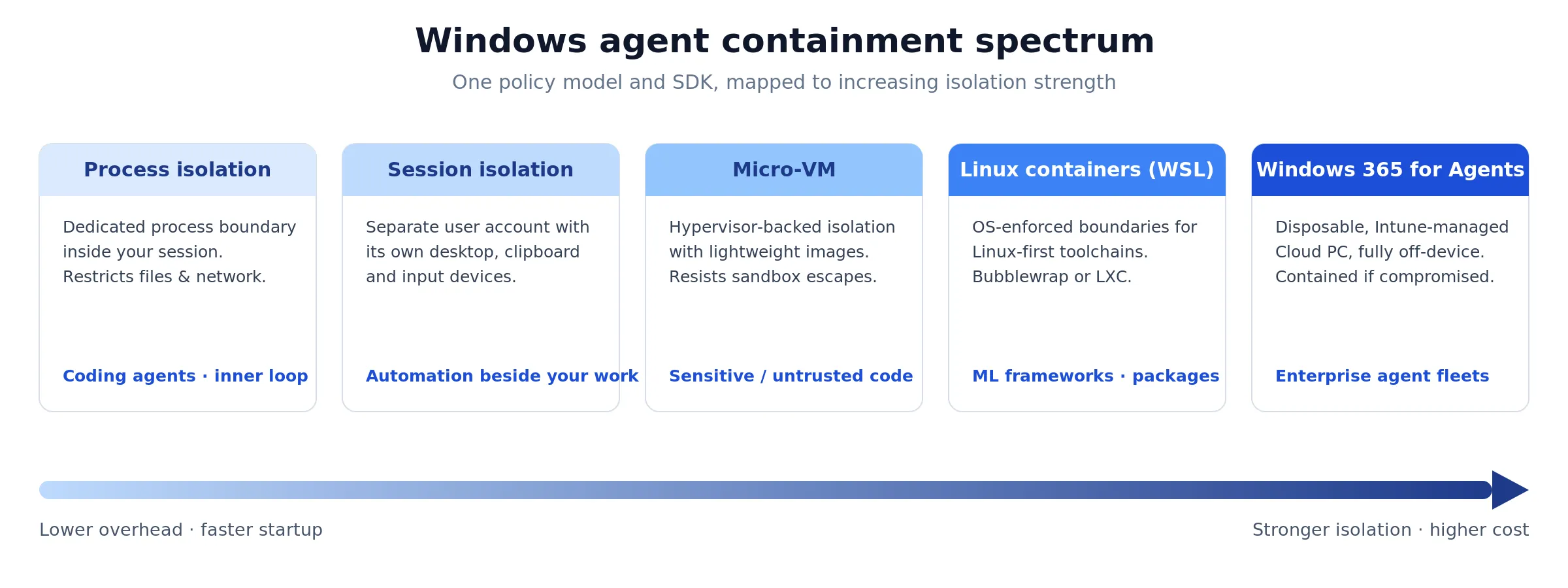 The same SDK spans lightweight in-session isolation through to a disposable cloud PC. Stronger boundaries cost more to run.
Process isolation is the lightweight default. It runs model-generated code in a dedicated process boundary that restricts file and network access, while staying inside the user’s environment. It is fast enough to keep a coding agent’s edit-run loop responsive. GitHub Copilot CLI has already adopted MXC process isolation to constrain what its generated code can do.
Session isolation goes further. It separates the agent’s execution from your interactive desktop, clipboard, UI, and input devices by running it under a distinct user account. That mitigates UI spoofing, input injection, and cross-session data leakage — relevant for agents that run automation alongside your own work. The initial release supports non-interactive sessions only.
Micro-VMs add a hardware-backed boundary through the hypervisor, using lightweight images for higher density than full VMs. They target higher-risk workloads: agents processing sensitive data or running untrusted external code where a sandbox escape is the threat you actually care about.
Linux containers via WSL bring the same policy model to Linux-first toolchains, so ML frameworks and package managers run with OS-enforced boundaries. Windows 365 for Agents extends containment off the device entirely, running the agent in an Intune-managed Cloud PC that is disposable if compromised.
The useful idea is that all of these share one SDK and one policy model. You can move an agent from process isolation to a micro-VM by changing configuration, not rewriting your integration.
Your first sandbox
Here is the one-shot SDK pattern. Check platform support, build a config from a policy, point it at a command, and spawn it.
import {
  createConfigFromPolicy,
  spawnSandboxFromConfig,
  getPlatformSupport,
} from '@microsoft/mxc-sdk';

if (!getPlatformSupport().isSupported) {
  throw new Error('MXC not available on this host');
}

const config = createConfigFromPolicy({
  version: '0.6.0-alpha',
  filesystem: {
    readonlyPaths: ['C:\\agent\\tools'],
    readwritePaths: ['C:\\agent\\scratch'],
  },
  network: { allowOutbound: false },
  timeoutMs: 30_000,
});

config.process!.commandLine =
  'python -c "print(\'hello from the sandbox\')"';

const child = spawnSandboxFromConfig(config, { usePty: false });
child.stdout!.on('data', (d) => process.stdout.write(d));
child.on('close', (code) => console.log('exit:', code));
The agent’s generated command runs with read-only access to its tools, a single writable scratch directory, and no outbound network. Everything else on the machine is invisible to it.
Use schema version 0.6.0-alpha for new code — it is the current stable schema on every supported platform. Version 0.7.0-dev carries the experimental backends and the state-aware lifecycle, but it is not stable yet.
Writing policy
Under the SDK, MXC is driven by JSON. Defining policy directly is worth understanding, because it is what you will audit and what Intune will eventually enforce.
A filesystem policy lists what the sandbox can read and write:
{
  "script": "python -c \"open('C:\\\\temp\\\\out.txt','w').write('ok')\"",
  "processContainer": { "name": "agent-fs-demo" },
  "filesystem": {
    "readwritePaths": ["C:\\temp"],
    "deniedPaths": ["C:\\Windows\\System32"],
    "clearPolicyOnExit": true
  }
}
A network policy blocks outbound traffic by default and allows only named hosts:
{
  "script": "import urllib.request; urllib.request.urlopen('https://api.github.com')",
  "network": {
    "defaultPolicy": "block",
    "enforcementMode": "firewall",
    "allowedHosts": ["api.github.com"]
  }
}
Default-deny is the right posture for an agent. Start with nothing, then add the specific hosts and paths a task needs. A UI policy covers clipboard, display, and GUI access for the cases where session isolation alone is too coarse.
Identity and governance
Containment without attribution is half a solution. You also need to know who did what.
Session isolation runs each agent under its own account — a local ID or a cloud-provisioned identity backed by Microsoft Entra. Every action the container takes is attributed to that identity, so agent activity is cleanly separable from human activity in the audit trail. For anyone working in a regulated environment, that human-versus-agent distinction is the difference between an explainable log and a useless one.
On top of that, Microsoft Agent 365 applies MXC constraints through Entra and Intune. An IT team can require MXC isolation for a given agent and attach guardrails — filesystem rules, lifecycle policy — managed centrally rather than per machine. That is the piece that turns a developer SDK into something an organisation can actually govern.
Long-lived agents
The one-shot API fits a generate-and-run loop. Persistent agents need a lifecycle, and MXC exposes a state-aware one:
import {
  provisionSandbox, startSandbox, execInSandboxAsync,
  stopSandbox, deprovisionSandbox,
} from '@microsoft/mxc-sdk';
The stages run provision → start → exec → stop → deprovision. You stand a sandbox up once, run many commands against it, and tear it down when the agent’s task ends — useful for a session that spans dozens of long-running processes rather than a single throwaway script.
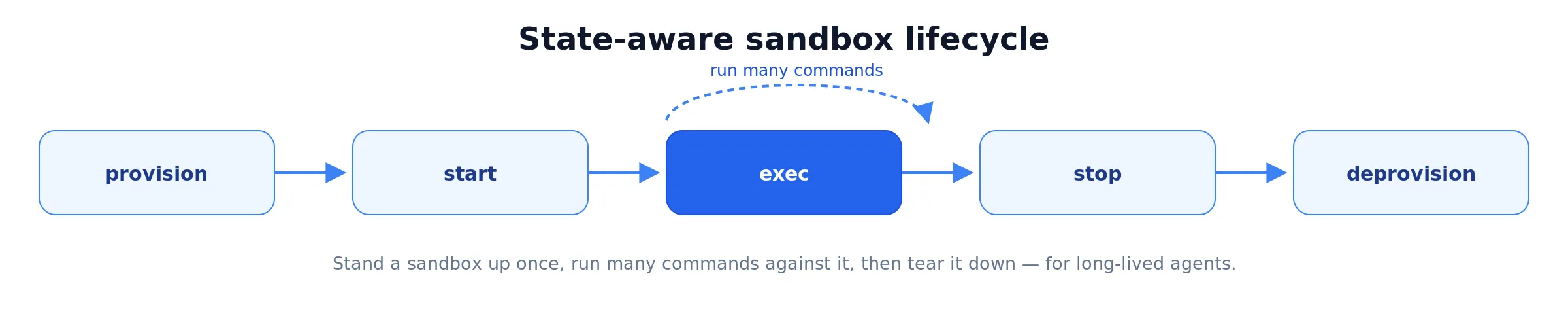 The state-aware API keeps a sandbox alive across many commands, unlike the one-shot pattern that spawns and exits per call.
The honest caveats
This is an early preview, and the repository is unusually direct about it. The maintainers state plainly that no MXC profiles should be treated as security boundaries currently, and that some generated policies are known to be overly permissive. Treat MXC today as a defence-in-depth layer and a place to give feedback, not as the thing standing between an agent and your data.
The platform gaps are specific and worth knowing before you build:
- Denied filesystem paths are not yet enforced on Windows, even though the schema accepts them. The
deniedPathsin the example above is aspirational on that platform for now. - Network host filtering is not yet supported on Windows, and proxy support is absent on macOS.
- Experimental backends — Windows Sandbox,
wslc, micro-VM, Seatbelt,isolation_session, Hyperlight — require an explicit{ experimental: true }flag or the--experimentalCLI switch.
The build requirements are also strict: a pinned Rust 1.93 toolchain and Node.js 18 or newer, with process-container isolation needing Windows 11 24H2 and session isolation needing a specific Insider build. This is not yet a “works on any laptop” story.
Getting started
If you build agents that run generated code, MXC is worth a prototype now and a production look later. The migration path it promises — same SDK from local process isolation to a hardware-backed micro-VM to a cloud PC — is the part that could matter most, because it means the containment decision does not lock your architecture.
Start with @microsoft/mxc-sdk on a Windows 11 24H2 box, wrap a single tool call in process isolation with a default-deny network policy, and watch what breaks. The gaps will tell you more about where agent security actually stands than any keynote will.
What are you running your agents inside today? If the answer is “my own session”, that is the gap MXC is built to close.